react-native-workers 1.0.0-alpha: real multithreading for React Native

React Native has always been single-threaded where it matters most. Your JavaScript runs on one thread, and anything heavy you do there — parsing a big payload, hashing, compression, image work, a chatty reducer, a busy render — competes with the UI for the same runtime. The usual advice is "move it native," but that means writing a native module for every heavy thing you'd rather just write in JS.
react-native-workers brings the Web's answer to this problem to React Native:
real background threads, each with its own JavaScript runtime, behind the Worker
API you already know from the browser. Today it enters public alpha as
1.0.0-alpha.
This post is the full tour — what it is, how it's built, everything it can do (including some things a worker library usually can't), how hard it's been tested, what's still rough, and where it's going.
SharedBuffer. Each run reports the worst UI frame gap it caused — one frame, while a 250 ms blur runs.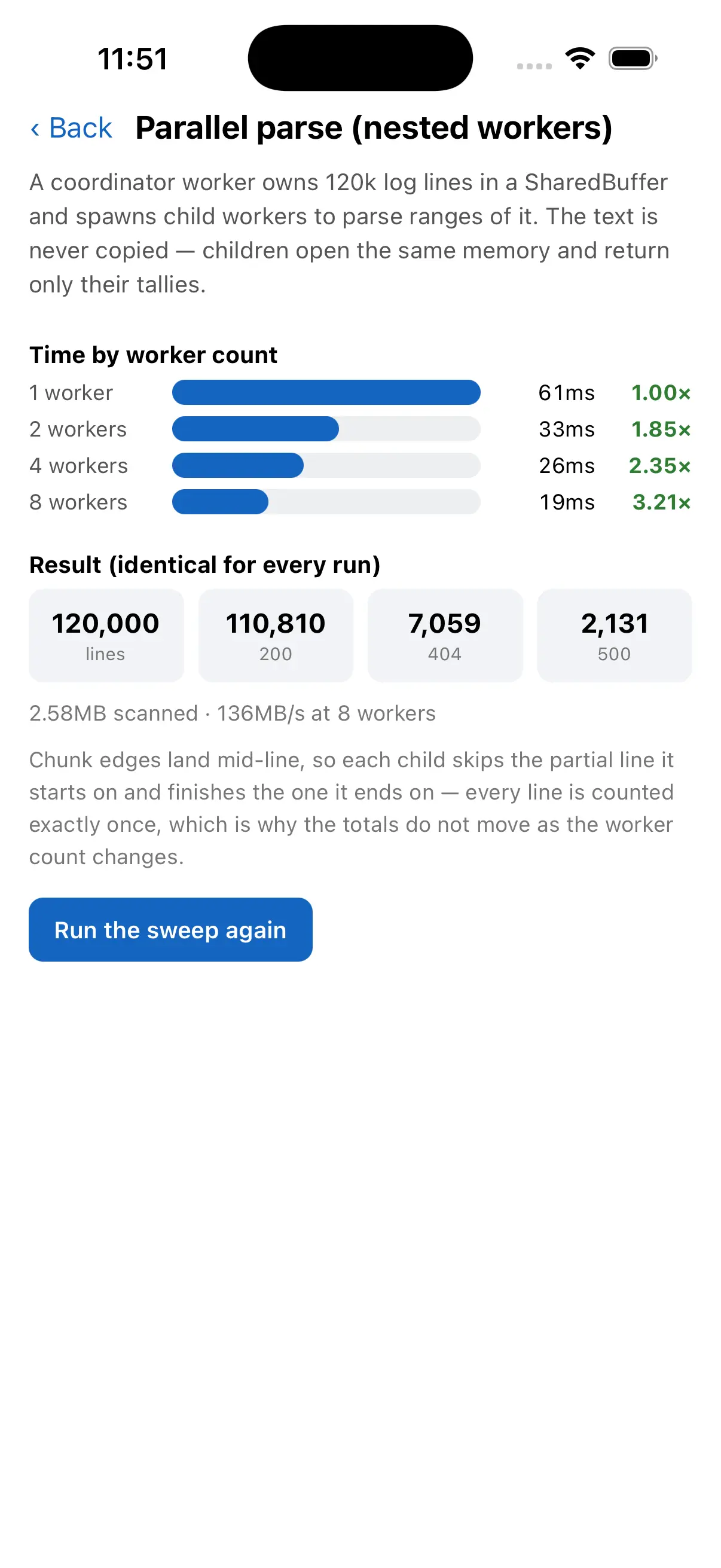
The shape of it
If you've used a Web Worker, there's nothing new to learn:
import { Worker } from '@ammarahmed/react-native-workers';

const worker = new Worker('./workers/heavy');
worker.onmessage = (e) => console.log('result:', e.data);
worker.postMessage({ items: 100_000 }); // returns instantly; runs off the UI thread
// workers/heavy.js — a normal module that runs on its own thread
self.onmessage = (e) => {
  const total = expensiveWork(e.data.items); // never blocks the UI
  self.postMessage(total);
};
That's the shape; for a real one, the parallel-parsing tutorial moves JSON parsing off the UI thread step by step. A worker takes a couple of options that are worth knowing up front:
const worker = new Worker('./workers/importer', {
  nativeModules: true, // let the worker reach the app's native modules (more below)
  name: 'importer',    // shows up in logs and in the DevTools target list
});
Call worker.terminate() when you're done and the whole runtime + thread goes away.
Everything else — postMessage, onmessage, onerror, nested workers — behaves the
way you'd expect coming from the browser.
Inline workers, when a file is overkill
For a one-off or a dynamically generated worker, skip the file and pass source directly. Inline workers need no Babel plugin and no bundling step — which also makes them the path that works everywhere today (more on that in What "alpha" means):
const doubler = new Worker({
  inline: `self.onmessage = (e) => self.postMessage(e.data * 2);`,
});
When something throws
Errors in a worker don't crash your app — they surface on onerror, with the source
location carried across the thread boundary:
worker.onerror = (e) => {
  console.log(e.message, 'at', e.filename, ':', e.lineno);
};
It's not built on Worklets — each worker is a full runtime
A common first question: is this Reanimated/Worklets under the hood? It isn't, and the difference is the whole point.
react-native-workers spins up a separate Hermes runtime on its own OS thread for
each worker, with its own event loop, its own bundle, and full import support.
That's the Web Worker model: real, independent runtimes that talk over messages.
Worklets are a different tool — they run serialized closures on a shared runtime with shared values, which is perfect for driving animations but isn't a place to run a whole module graph. react-native-workers runs alongside worklets; it's for the "I have real work to do off the main thread" case.
Under the hood
It helps to know what actually happens when you write new Worker('./workers/heavy'):
- A fresh Hermes runtime is created on a dedicated thread (via
hermes::makeHermesRuntime). Nothing is shared implicitly — the worker has its own globals, its own module registry, its own garbage collector, capped at Hermes' 256 MB heap default. - Worker files are compiled into their own bundles. A Babel plugin picks up each
new Worker('./path'), points it at a bundle built from that module (and its imports), and Metro serves or ships that bundle. You write normal modules; you don't hand-manage bundles. Inline workers skip this entirely. - Messages cross via a structured-clone codec — objects, arrays,
Date, typed arrays,ArrayBuffer, and cycles are serialized between runtimes. - A per-worker
CallInvokerkeeps everything thread-consistent. Async native work and promises resolve back on the worker's own thread, not the main one — which is what makes the native features below safe rather than a source of cross-thread crashes.
The worker's global scope is set up to feel familiar: self, postMessage,
structuredClone, queueMicrotask, a Worker constructor for nesting,
NativeEventEmitter, and the native-module accessors described next.
Reaching the native side
A background thread that can only do pure computation is useful. A background thread that can reach the native side is a different class of tool — and this is where react-native-workers goes past a typical worker library.
Two tiers: C++ by default, platform modules on request
There are two levels of native access, by design:
- C++/JSI modules are available in every worker out of the box — including this library's own module, which is what lets a worker create nested workers.
- The app's platform (Java/Objective-C) TurboModules and legacy native modules are
opt-in, because they're heavier and not all of them are safe off the main thread.
Turn them on per worker with
nativeModules: true.
const worker = new Worker('./workers/db', { nativeModules: true });
Worker-unsafe modules — anything that assumes the UI thread, the surface registry, and so on — are denylisted so they can't be pulled into a worker by accident. On iOS there's no setup; on Android you hand the library your package list once. The native modules guide covers the model, and the download-manager tutorial puts native modules to work inside a worker end to end.
Expo Modules, inside a worker — on iOS and Android
This is the one I'm most excited about. In an Expo app, requireNativeModule(...)
works directly inside a worker, across the whole module surface:
// inside a worker (nativeModules: true, in an Expo app)
const Device = requireNativeModule('ExpoDevice');
Device.osName;                         // constants — read synchronously
await Device.getDeviceTypeAsync();     // async functions — invoked natively

const Crypto = requireNativeModule('ExpoCrypto');
Crypto.randomUUID();                   // sync functions — a value, not a Promise

const Foo = requireNativeModule('SomeModule');
Foo.someProperty;                      // live properties, read on access
const sub = Foo.addListener('onX', handle); // module events, delivered into the worker
sub.remove();
Constants, sync and async functions, live properties, and module events — the whole thing, running through Expo's real implementation, with nothing crossing between runtimes (that would crash). The two platforms get there differently, and getting both working was most of the effort behind this release:
- On iOS, the Swift↔C++ boundary makes a second Expo
AppContextimpractical, so the library installs its ownglobal.expo.modulesinside the worker that forwards each call natively through Expo's publicAppContextAPI — native values in, native values out, results delivered back on the worker thread. - On Android, Expo's JNI install accepts a raw runtime pointer, so the library
builds a genuine per-worker Expo
AppContextand lets Expo installglobal.expoagainst the worker runtime directly — every feature runs through Expo's own code.
From your side, it's just requireNativeModule. Because these lean on Expo internals,
the version matrix (below) exists specifically to catch the day Expo changes them. The
installation guide has the Expo setup,
and the repo's Expo example
runs a worker probe that exercises the whole surface on both platforms.
UIWorker — drive native UI from a worker
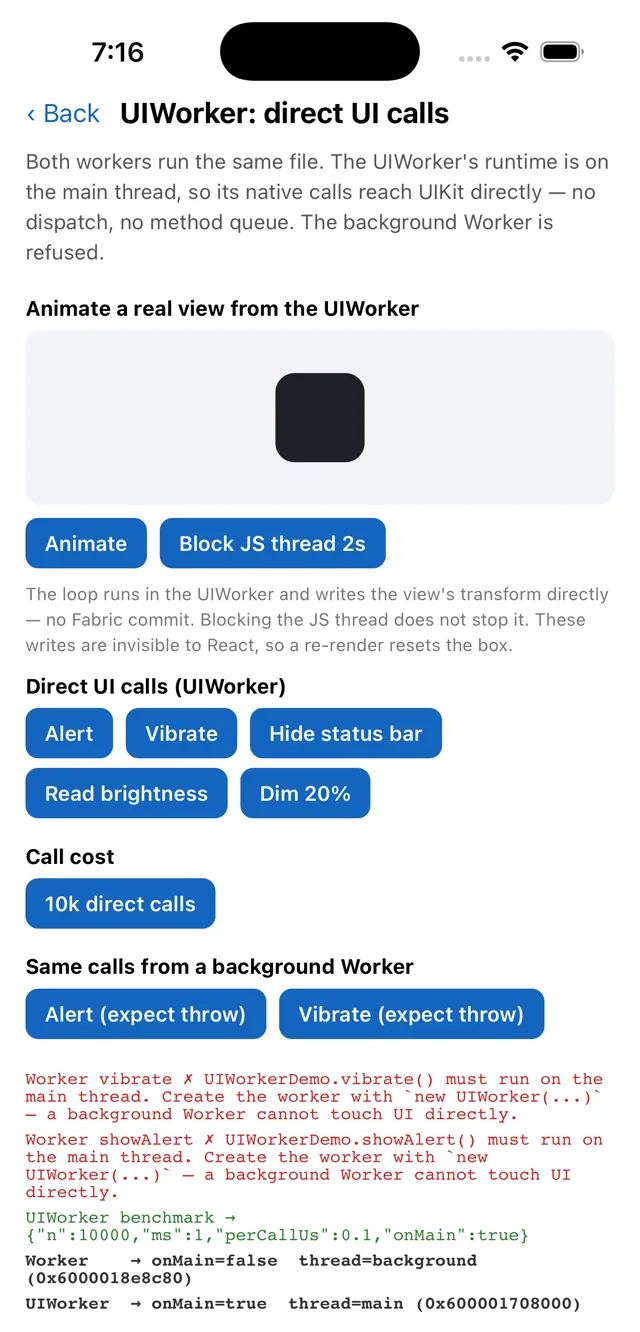
Beyond request/response, UIWorker lets worker code render and update native
components, with events delivered natively rather than round-tripping through the main
JS thread. UIWorker runtimes are shared and persistent by default — asking for the
same worker twice reconnects to the already-loaded runtime instead of re-evaluating it
— with an independent option when you want a private, 1:1-lifetime runtime like a
background Worker. See the UIWorker guide for the full API,
and the UIWorker demo and
native components from a worker tutorials for
it in action.
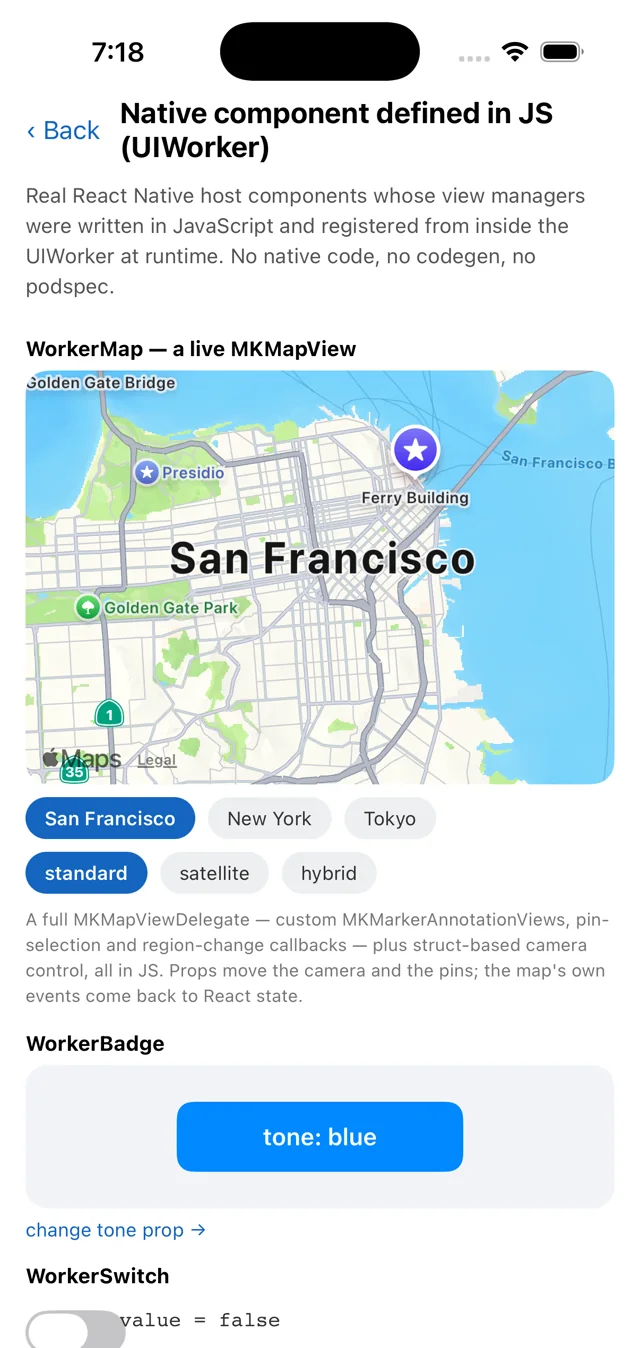
MKMapView host component whose view manager is JavaScript, registered from inside a UIWorker — no native code, no codegen.Sharing state without copying everything
Messages are great until you're moving a lot of data back and forth. So there are
shared primitives that live across runtimes — SharedStore,
SharedValue, and
SharedBuffer (there's an
overview tying them together).
SharedStore — a cross-runtime key/value store
import { SharedStore } from '@ammarahmed/react-native-workers';

const store = new SharedStore('prefs');
store.set('theme', 'dark');
const unsub = store.subscribe('theme', (v) => applyTheme(v));

// from any other runtime:
store.get('theme'); // 'dark'
set / get / has / delete / keys / subscribe — a small, observable store any
runtime can read, write, and watch.
SharedValue — one shared, observable value
Handy for a progress figure or a flag that the UI wants to reflect live:
import { SharedValue } from '@ammarahmed/react-native-workers';

const progress = new SharedValue('import-progress', 0);
// in the worker:
progress.value = 0.5;
// on the UI:
progress.subscribe((v) => setProgress(v));
SharedBuffer — raw shared memory
The zero-copy building block: a block of memory shared across runtimes, with a lock so writers and readers don't tear:
import { SharedBuffer } from '@ammarahmed/react-native-workers';

const buf = new SharedBuffer('frame', 1920 * 1080 * 4);
buf.withLock(() => {
  // write bytes here in the worker; the UI reads the same memory — no message copy
});
withLock keeping the window it copies consistent.reactive() and defineModule() — higher-level coordination
On top of the store, reactive() gives you a
proxy-based state object that syncs across the boundary — mutate it like a plain object,
and other runtimes see the change (the note-editor tutorial
builds a whole editor on it):
import { reactive, SharedStore } from '@ammarahmed/react-native-workers';

const state = reactive(new SharedStore('import')); // observable, cross-runtime
state.progress = 0;        // set from the worker
state.progress += 0.1;     // mutate; the UI's subscription fires
And defineModule() is a small, fully-typed RPC bridge for when you'd rather call
methods than hand-roll a message protocol: from one contract you get to call host
methods from the worker, emit events both ways, and share reactive state — all
typed end to end, with a dispose() to tear it down. The
defineModule guide has the full shape.
Running a worker's JS on another thread (experimental)
Everything above moves data between runtimes. The newest piece moves the thread instead.
A worker's runtime is normally pinned to its own thread. The experimental
Thread API lets that same runtime temporarily execute somewhere else — the
main/UI thread, or a background thread you create:
enableMultiThreadingExperimental();

const codec = Thread.create('codec');

await codec.run(() => {
  const pixels = decodeFrame(bytes);   // on the 'codec' thread
  const summary = analyze(pixels);

  Thread.main.run(() => {
    applyToNativeView(summary);        // on the main thread
  });
});
The important part is what isn't happening: there's no second runtime and nothing is serialized. The callback is a plain closure that keeps every binding it captured — same variables, same objects, same identity. Only the OS thread executing the runtime changes.
let progress = 0;
await codec.run(() => { progress = 50; }); // same variable, no message passing
console.log(progress);                     // 50
That works because every entry into a worker's runtime — its event loop, timers,
native module callbacks, the debugger, and Thread.run — now goes through a
per-worker lock, so exactly one thread is ever inside the runtime. It is thread
affinity, not parallelism: a run() body is atomic, and a slow one blocks the
worker (or janks the UI, if it's on Thread.main).
Promises settle back on the worker's own thread, so await always returns you
where you started and thread changes only ever happen inside a run() callback —
the single-threaded mental model survives.
It's off by default and gated per worker behind
enableMultiThreadingExperimental(). The Thread hopping
guide covers the rules before you ship it — and when a
plain Worker or a UIWorker is the better tool.
Messaging, cloning, and nesting
Data crosses the boundary via structured clone — objects, arrays, Date, typed
arrays, ArrayBuffer, and cycles all survive (a few types don't yet; see below), all
covered in the messaging guide. Nested workers work — a
worker can spawn its own children and relay their results — and RN device events are
forwarded into workers (native events guide), so a worker
can listen for the same app-level events the main thread sees — the
sensor-stream tutorial leans on exactly that.
Debugging
Workers aren't a black box:
console.*inside a worker is forwarded to your main logs, tagged per worker ([Worker:<name>]), so you see worker output where you already look.- Every background worker is its own DevTools target — breakpoints and stepping,
no flag required. A
UIWorkeris the exception: it runs on the main thread, where a debugger pause freezes the whole app, so it takes an explicitinspectable: true.
Tested against a lot of React Native and Expo
react-native-workers is New-Architecture-native: bridgeless, Hermes, JSI throughout. It supports React Native 0.81.4+ on iOS and Android.
Depending on private React Native and Expo internals is a fact of life for a library like this — so there's a compatibility matrix that scaffolds a fresh app against each version and compiles the native code, on every relevant release:
- React Native 0.81, 0.82, 0.83, 0.84, 0.85, 0.86,
latest, and thenextrelease candidate. - Expo SDK 54, 55, 56, 57, and
latest.
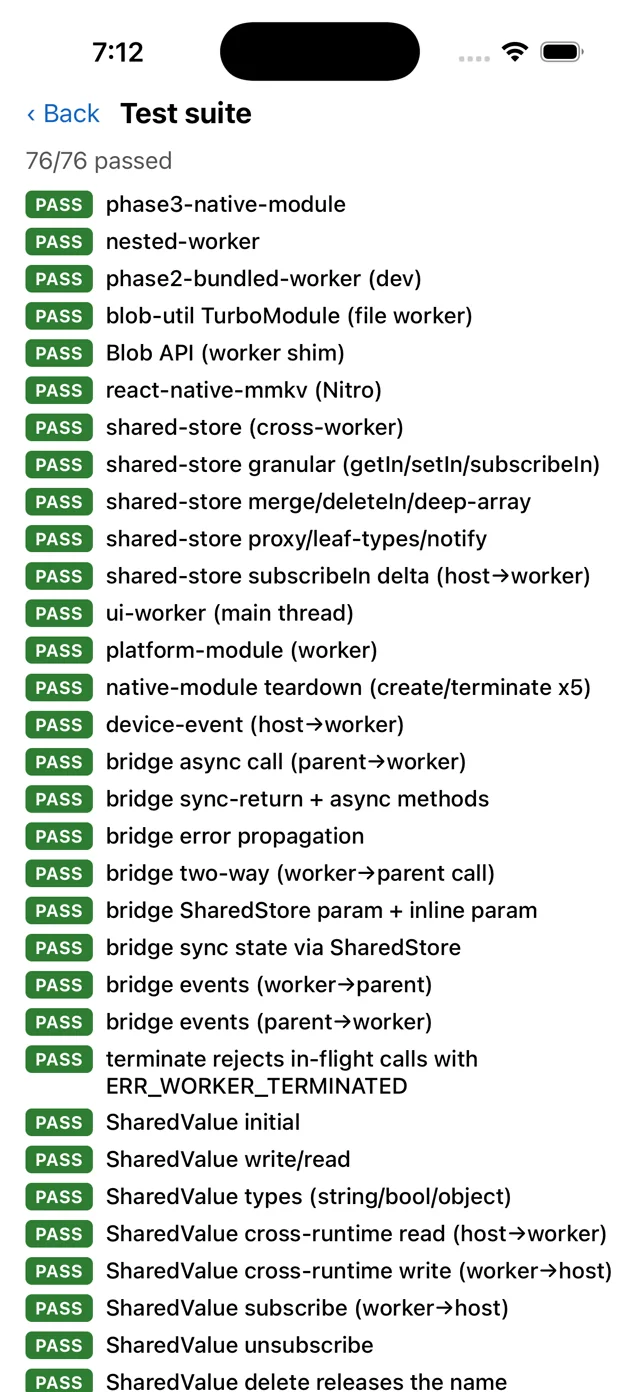
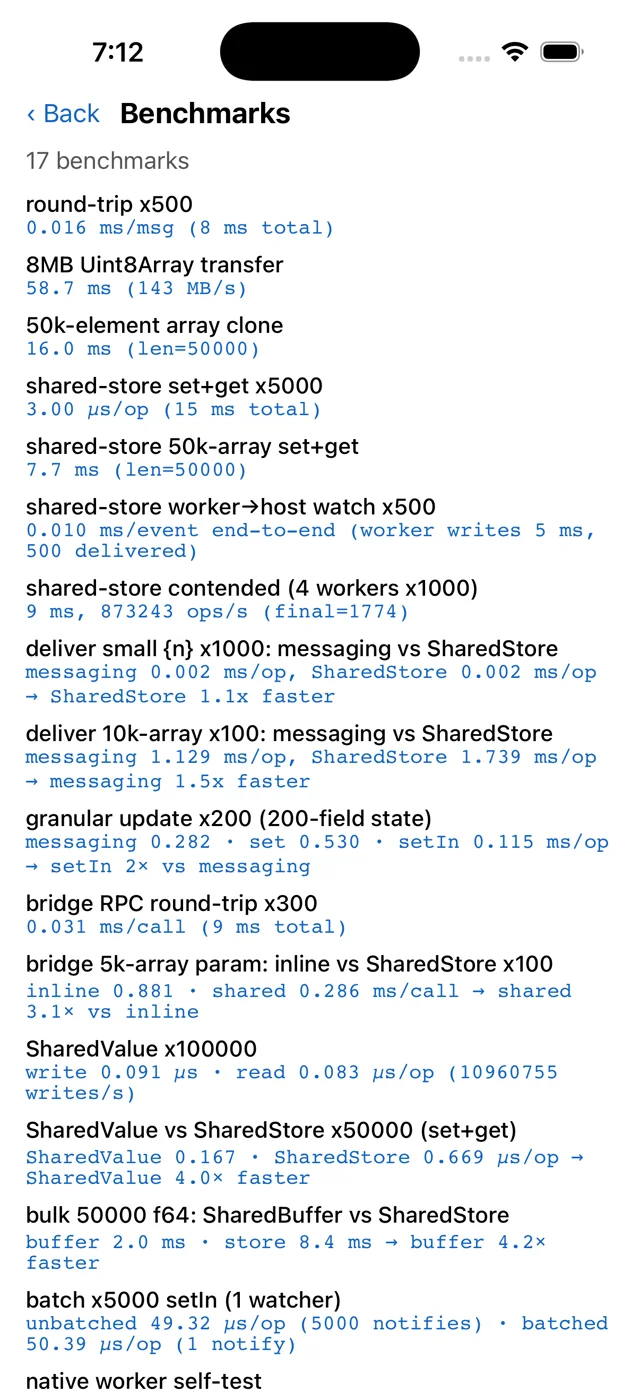
On top of that, the example app carries an on-device conformance suite and a benchmark screen — both of which you can run yourself from the example app:
What "alpha" means
The core is implemented and tested on both platforms, and the API is close to what I
want it to be — but this is a 1.0.0-alpha, so:
- Release builds need one extra build step. In development Metro serves each worker bundle and there's nothing to set up; a release build compiles them ahead of time and ships them inside the app, which means wiring the bundling step into Xcode/Gradle — see Bundling for release. Inline workers need no build setup at all.
- Structured clone doesn't yet copy
Map,Set,RegExp,Error, orBigInt. Threadis experimental, off unless you callenableMultiThreadingExperimental(), and its shape may change. There is no synchronousrunSyncon purpose — see the rules.- The API may still shift before
1.0.0.
If you hit an edge, that's exactly the feedback this release is for.
Where it's going
A couple of things on the near horizon:
- A wider clone subset —
Map,Set,RegExpandErroracross the boundary, so fewer values need reshaping before you send them. - Transferables — a
postMessage(msg, [transfer])transfer-list on top of the shared-memory primitives that already exist, for true zero-copy handoff. - Settling
Thread— the experimental API either graduates or changes shape based on what people hit using it.
Try it
npm install @ammarahmed/react-native-workers@alpha
Then the Installation guide and the Quick start get you running your first worker in a few minutes, and the guides go deep on native modules, UIWorker, and shared state. Every feature above has a runnable example — browse them all under Examples, or clone the example app and run it.
If you're building something that would genuinely benefit from real threads — a heavy importer, an on-device pipeline, a game loop, an editor that shouldn't stutter — this is a great time to try it and tell me what breaks or what's missing.
More threads, less jank. Let's see what you build.