Building a native component in JavaScript
What you'll build: WorkerSwitch — a real, native UISwitch used from React
like any component from a native library:
<WorkerSwitch value={on} onValueChange={setOn} style={{ width: 51, height: 31 }} />
Fabric mounts it, Yoga lays it out, its value flows down as a native prop and
its change event comes back up to React state — but its view manager is written
entirely in JavaScript and registered from inside a UIWorker at runtime. No
native code, no codegen, no podspec. The same pattern builds WorkerBadge (a styled
label) and WorkerMap (a full MKMapView with a JS delegate).
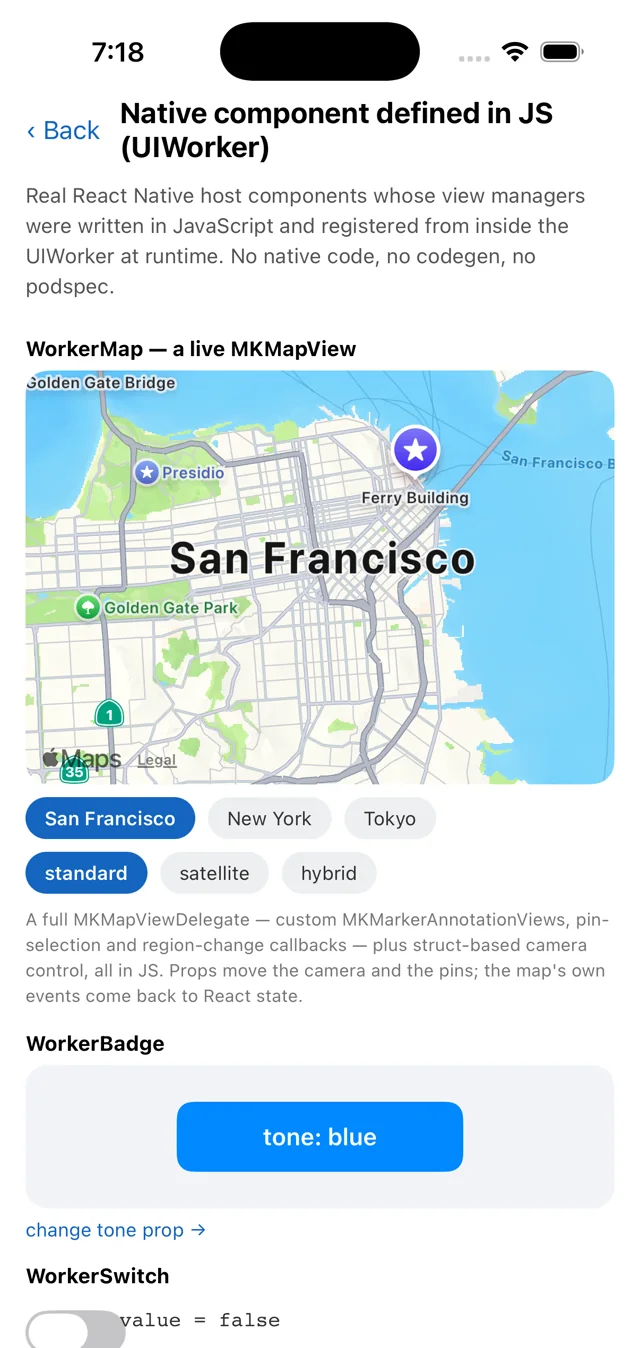
UIWorker at runtime.Files: example/src/workers/nativecomponents.ts ·
example/src/workers/helpers/native-component.ts ·
example/src/native-components/createWorkerComponent.tsx ·
example/src/screens/NativeComponentScreen.tsx
This builds on @nativescript/react-native
(a preview package, iOS only) and on runtime Obj-C class building and
view-manager registration. It's a demonstration of how far a UIWorker can go —
not a supported, blessed API. Read it for the ideas; treat the code as a demo.
NativeScript is an open-source runtime that exposes the
entire native platform API to JavaScript. Its
@nativescript/react-native package
(the napi-ios project) brings that to iOS via libffi/JSI, so from JS you can call
any Obj-C class, C function, struct maker, and constant — including UIKit and the
RN Obj-C runtime. That's the one dependency that makes everything below possible; it
is not part of this library. See nativescript.org for
the project.
The idea
A React Native "host component" (like <View>) is backed by a native view
manager — an Obj-C RCTViewManager subclass that builds the platform view and
declares its props. Normally you write that in Objective-C and run codegen.
But a UIWorker runs JS on the main thread, and
@nativescript/react-native exposes the whole Obj-C runtime to that
JS. So from worker JavaScript you can do everything the native manager would:
- build the
UIView(UISwitch.alloc().init…), - subclass
RCTViewManagerand register it with React Native, - declare props so RN sends them down natively, and
- respond to the view's events.
React Native then treats the result as a genuine component. Props ride RN's own native prop pipeline and events ride its own event pipeline — nothing crosses the worker's RPC bridge at runtime (it's used once, at startup, to fetch the list of components). Let's build it.
Step 1: a component is a class
The example wraps the mechanics in a small base class, NativeComponent
(helpers/native-component.ts). You write a subclass that declares its props and
events, and implements two methods:
import { NativeComponent, registerComponents, serveComponents }
  from './helpers/native-component';

class WorkerSwitch extends NativeComponent {
  static props = ['value', 'tint'];
  static events = ['onValueChange'];

  create() {
    // Build the real UIKit view. Runs on the main thread.
    const view = UISwitch.alloc().initWithFrame(CGRectMake(0, 0, 51, 31));
    this.onControl(view, UIControlEvents.ValueChanged, () =>
      this.emit('onValueChange', { value: view.on })
    );
    return view;
  }

  update(props: { value?: boolean; tint?: boolean }) {
    // Apply props. Called on mount and on every host-side change.
    if (props.value != null && this.view.on !== !!props.value) {
      this.view.setOnAnimated(!!props.value, true);
    }
    if (props.tint) this.view.onTintColor = UIColor.systemGreenColor;
  }
}
static propslists the prop names RN should route toupdate().static eventslists theon<Event>callback prop names.create()builds and returns theUIView. The base class stores it asthis.view. One instance per mounted view.update(props)applies props (accumulated, so read whatever you need offprops);this.viewis always available.this.emit(event, payload)fires the matchingon<Event>React prop, withpayloaddelivered asevent.nativeEvent.this.onControl(control, events, handler)wires a UIKit control event.
create(), not update()A native proxy isn't a stable JS identity, so a view.__wired guard doesn't
survive, and wiring from update() would add a fresh target/action on every prop
change (double-firing events). Do it once, in create().
Step 2: register it with React Native
One call publishes your classes:
registerComponents([WorkerBadge, WorkerSwitch, WorkerMap]);
serveComponents();
registerComponents is where the runtime magic happens. For each class it builds an
Obj-C view manager and drops it into RN's module list:
const Manager = RCTViewManager.extend(
  {
    view() { /* new instance; return instance.create() */ },
    // ...one propConfig + setter per declared prop (Step 4)
  },
  { name: `${name}Manager`, exposedMethods /* signatures for the new methods */ }
);
RCTRegisterModule(Manager);
Three details make this work, all Obj-C-runtime facts you can lean on:
RCTViewManager.extend({ view() {…} }, …)allocates a real Obj-C class at runtime whose-viewmethod is your JS function. (-viewalready exists onRCTViewManager; NativeScript'sextendcan override existing members.)- The class is named
<Component>Manager.RCTViewManagerusesRCT_EXPORT_MODULE()with no argument, so its+moduleNameis@"", and RN's legacy-interop layer falls back to "class name minusManager" to name the component. SoWorkerSwitchManager→ the componentWorkerSwitch. RCTRegisterModule()drops the class intoRCTGetModuleClasses()— the exact list RN scans when deciding whether a component name is supported.
When the host later renders <WorkerSwitch>, Fabric asks
RCTComponentViewFactory if the name is supported, the scan finds
WorkerSwitchManager, and RN mounts a legacy-interop view whose coordinator calls
your -view to build the UISwitch.
serveComponents() exposes a tiny RPC module (nativecomponents) with a single
list() method that returns the registered component descriptors — the host queries
it once to learn each component's name, props, and events. It's not on the
per-prop path.
Step 3: resolve it on the host
The host side (native-components/createWorkerComponent.tsx) turns a component
descriptor into a React component:
import * as NativeComponentRegistry
  from 'react-native/Libraries/NativeComponent/NativeComponentRegistry';

const validAttributes = {};
for (const prop of descriptor.props) validAttributes[prop] = true;

const Host = NativeComponentRegistry.get(descriptor.name, () => ({
  uiViewClassName: descriptor.name,
  validAttributes,   // the native props RN is allowed to send down
}));
Why NativeComponentRegistry.get and not requireNativeComponent? The public
requireNativeComponent takes the legacy path and asks native for the view
config — which a view manager registered at runtime can't answer. In bridgeless
mode NativeComponentRegistry.get uses the static view config
(native: !global.RN$Bridgeless), i.e. the JS-authored one you pass in. The
validAttributes map is what tells RN which props are real native props to send
down the pipeline — so it must list exactly the names the worker declared.
Step 4: props go down natively
Props flow down React Native's own native pipeline — the same one a codegen'd
component uses. You declare a prop's name in static props, and registerComponents
does the rest: it tells RN about the prop and wires a setter that calls straight into
your update().
// the helper's setter, added per declared prop — RN calls it when the prop changes:
set_value(json, view) {
  const instance = instances.get(view);   // view → your NativeComponent
  const state = { ...prevProps, value: toJS(json) };
  instance.update(state);                  // your update() runs, on the main thread
}
So a prop change on the host travels down RN's commit → mount pipeline and calls
your worker's update() directly — no RPC message, no tag bookkeeping. The host
wrapper does nothing but forward the prop:
<Host ref={ref} style={style} {...nativeProps} /> // RN sends value/tint down natively
Style and layout still go through Yoga natively, and the RCTView props the manager
inherits (backgroundColor, opacity, …) keep working the native way.
Step 5: events go up natively too
Events flow through React Native's own event pipeline — no bridge. RN hands the
view a native dispatching block through a set<Event>: setter; the helper captures
that block and, when the control fires, invokes it. The one wrinkle: NativeScript
can't call a runtime-supplied native block directly, so it lets the Obj-C runtime
do it. The helper
handles this — components just declare static events and call this.emit():
// build the view so RN's event blocks are captured, then emit normally:
create() {
  const view = this.hostView(UISwitch).alloc().initWithFrame(CGRectMake(0, 0, 51, 31));
  this.onControl(view, UIControlEvents.ValueChanged, () =>
    this.emit('onValueChange', { value: view.on })
  );
  return view;
}
this.emit('onValueChange', payload) invokes RN's dispatching block, RN's event
system routes it, and the payload arrives at the React callback as
{ nativeEvent: payload } — exactly like a native component's event:
<WorkerSwitch onValueChange={(e) => setOn(e.nativeEvent.value)} />
On the host, the only extra step is telling RN about the event names, which
createWorkerComponent does from the descriptor (a bubblingEventTypes entry per
on<Event>); the on* callbacks then pass straight through to the view.
Step 5b: containers with nested React children
A worker-defined component can be a container: anything you nest inside it in
JSX mounts into its native view, laid out by Yoga against that view's box. That
also rides RN's own path — Fabric's interop layer calls insertReactSubview:atIndex:
and then didUpdateReactSubviews on your view, and the default implementation of
the latter simply addSubview:s the children. So children work with no extra code.
Override childrenView() when UIKit wants them somewhere other than the view
itself — a UIVisualEffectView only accepts subviews in its contentView:
class WorkerCard extends NativeComponent {
  static props = ['material', 'cornerRadius'];
  static events = ['onChildrenChange'];

  create() {
    return this.hostView(UIVisualEffectView)
      .alloc()
      .initWithEffect(UIBlurEffect.effectWithStyle(UIBlurEffectStyle.Regular));
  }

  childrenView() {
    return this.view.contentView;      // where React children land
  }

  childrenChanged(count: number) {     // React added or removed children
    setTimeout(() => this.emit('onChildrenChange', { count }), 0);
  }
}
<WorkerCard material="regular" cornerRadius={18}>
  <Text>San Francisco</Text>
  <Text>2 pins · backdrop blurred by UIKit</Text>
</WorkerCard>
Three things are worth knowing about containers:
- Don't set
paddingon the container's style. RN gives a legacy-interop component's view the content frame (inset by padding and border) while Yoga has already offset the children by the same amount — so padding insets them twice. Put the spacing on the children (margins) or apply it natively. childrenChanged()reports mounted native views, not JSX nodes. RN collapses layout-onlyViews, so their children arrive as the container's own. The helper calls it only when the count actually changes: RN callsdidUpdateReactSubviewsafter every update, so reacting to each call (by emitting an event, say) would loop forever.- Nesting another worker-defined component needs a real view in between. RN
mounts an interop child of an interop parent by re-parenting the child's own view,
which loses its position and drops it at the container's origin. Wrapping it in
<View collapsable={false}>keeps a genuine RN view as the parent and it lays out normally.
Step 6: use it like any component
Put it together on the host:
const w = new UIWorker('../workers/nativecomponents', { nativeModules: true });

await w.ready('nativecomponents', 8000);
const descriptors = await w.module('nativecomponents').list(); // one-time query
const WorkerSwitch = createWorkerComponent(descriptors.find(d => d.name === 'WorkerSwitch'));

// ...then render it like anything else:
<WorkerSwitch
  value={on}
  tint
  onValueChange={(e) => setOn(e.nativeEvent.value)}
  style={{ width: 51, height: 31 }}
/>
value flows down as a native prop; the change event comes back up through RN's
native event pipeline to React state — the whole loop running through the worker, on
the main thread.
It's native the whole way
Both directions ride React Native's own pipelines: props go down RN's prop pipeline
(batched into each commit), events come up RN's event pipeline (delivered as
{ nativeEvent }). Nothing crosses the worker's RPC bridge at runtime — the bridge
is used only once, to fetch the component descriptors at startup.
That means a worker-defined component behaves like a codegen'd one: props are batched with reconciliation, events dispatch through RN's own event system, and both cross the JS-thread → UI-thread boundary exactly once (the cost that actually matters).
The reusable pieces
Everything component-specific is just the WorkerSwitch class. The rest is
generic plumbing you'd extract into a library once and never touch again — two
small helpers.
Worker side — helpers/native-component.ts:
| Export | What it does |
|---|---|
class NativeComponent | The base class: declare static props / static events (and optional static componentName), implement create() / update(props) / dispose(). Gives you this.view, plus emit(event, payload), hostView(Base) (the view class to build so RN's event blocks are captured and React children are routed), childrenView() / childrenChanged(count) for container components, onControl(control, events, cb), and delegate(protocols, methods) for Obj-C delegates from JS. One instance per mounted view. |
registerComponents(classes) | For each class, builds a runtime RCTViewManager subclass: a -view method, per declared prop the metadata + setter RN needs to send it down natively, and per declared event the RCTBubblingEventBlock propConfig RN needs to wire it up. Registers it with RCTRegisterModule, remembers name → descriptor (re-registering the same name is a no-op), and returns the descriptors. |
serveComponents() | Registers the nativecomponents RPC module with a single list() that returns the descriptors — a one-time host query, not a runtime channel. |
Host side — native-components/createWorkerComponent.tsx:
| Export | What it does |
|---|---|
createWorkerComponent(descriptor) | Returns a React component. Resolves the host view via NativeComponentRegistry.get (props → validAttributes, events → bubblingEventTypes) and forwards all props and on* callbacks straight to it — RN drives both natively. |
To add a new component you write only a new NativeComponent subclass (declaring
its props/events) and drop it into registerComponents([...]). The helpers don't
change — that's the whole idea.
The whole flow
Three things happen: the worker registers a view manager with RN (once); the
host mounts the component, which drives RN to call the worker's create(); and
at runtime props flow down and events flow up, both through RN's own native
pipelines.
Read it as three passes: the registration path (WorkerSwitch →
registerComponents → RCTRegisterModule → RCTGetModuleClasses), the mount
path (render → NativeComponentRegistry.get → Fabric → -view → your create()),
and the two runtime channels — props down through RN's native set_<name>: setter
into your update(), and events up through RN's own event dispatcher back to your
callback prop.
Why the persistent UIWorker runtime matters
This example is the reason UIWorker runtimes are shared and persistent by
default. RCTRegisterModule is
permanent — React Native has no way to unregister a view manager. So the
runtime that owns those classes' -view closures must live as long as the
registration: for the whole process.
That's exactly what the persistent default gives you. The natural per-screen pattern just works:
useEffect(() => {
  const w = new UIWorker('../workers/nativecomponents', { nativeModules: true });
  // ...resolve + render...
  return () => w.terminate(); // disconnect this handle; runtime persists
}, []);
- First visit evaluates the worker and registers the managers.
- Navigating away calls
terminate()— a handle disconnect, not a teardown. - Coming back reconnects to the same runtime; the managers are already registered, so it just works, instantly.
independent or terminateRuntime() hereBoth recreate the runtime, and a second runtime that registers the same component names collides — while RN's cache still points the name at the reaped runtime, which crashes on the next render. This is an RN limitation, not a worker bug. A component-registering worker must be the shared, persistent kind. See the warning in the UIWorker guide.
Going further: WorkerMap
WorkerBadge follows the same shape with a UILabel. WorkerMap goes further: a
full MKMapView whose MKMapViewDelegate is written in JS via
this.delegate('MKMapViewDelegate', { … }) — custom MKMarkerAnnotationViews,
pin-selection and region-change callbacks, and struct-based camera control
(CLLocationCoordinate2DMake, MKCoordinateRegionMakeWithDistance). Its lat,
lng, radius, mapType, and pins are all native props that move the camera and
the annotations; the map's own onSelectPin / onRegionChange come back up RN's
native event pipeline. Building a delegate from JS is the single hardest thing in
Objective-C interop, and it's a few lines here. See workers/nativecomponents.ts for
the full component.
The same UIWorker trick without React in the picture at all — building a UIView,
a CAGradientLayer and a UILabel imperatively inside the worker and attaching
them to a React-rendered view by its Fabric tag — is the
NativeScript interop screen:
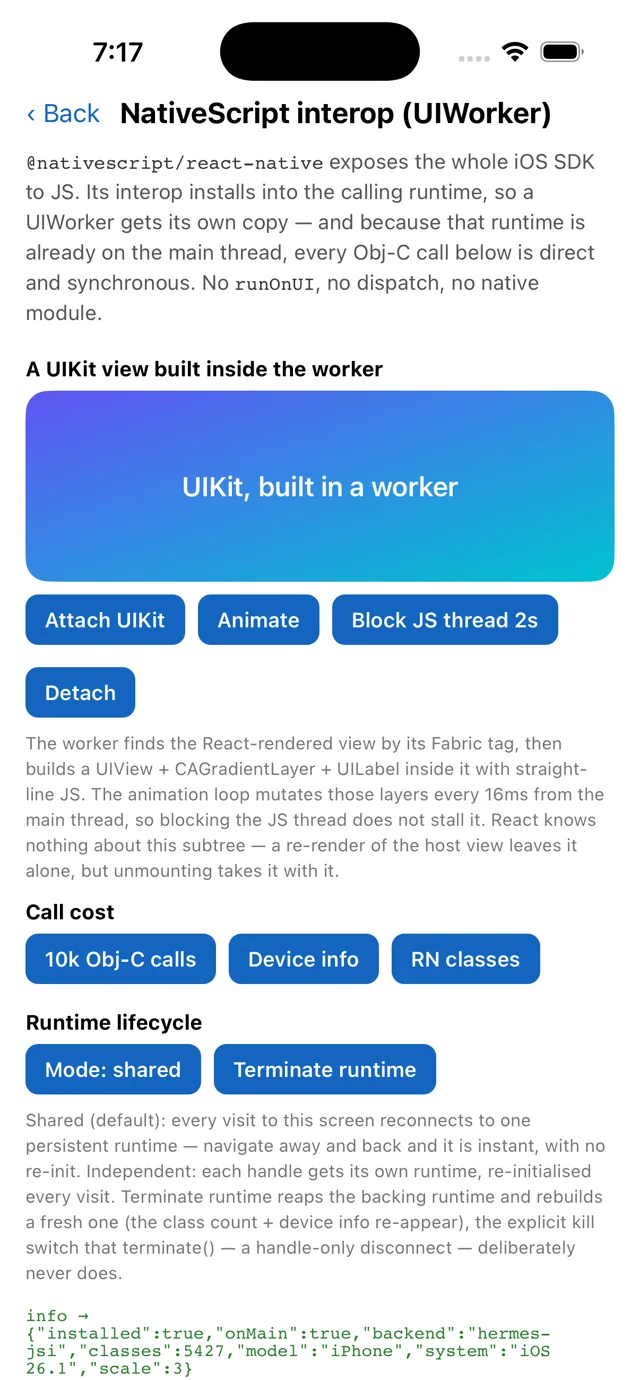
UIView + CAGradientLayer + UILabel built in worker JavaScript and attached to a React-rendered view. The log line comes from the worker runtime itself: 5,427 Obj-C classes reachable, on the main thread, with no dispatch.What to take away
- A
UIWorker+ full Obj-C interop lets you register a real RN view manager at runtime, entirely in JS — no native module, codegen, or podspec. - Props and events are both native — props ride RN's commit/mount pipeline
(batched with reconciliation), events ride RN's event dispatcher (delivered as
{ nativeEvent }). The RPC bridge is used only once at startup, to list the components. - Events work because the Obj-C runtime can invoke RN's native event block
(
imp_implementationWithBlock) even though NativeScript can't call it directly. - It only works because the worker runtime is persistent — permanent native registration demands a permanent runtime.
- It's iOS-only and experimental, but it shows the ceiling of what worker-driven native UI can be.